Backblaze Review 2026: Is Unlimited Backup Really Worth It?
Our Backblaze review 2026 delivers a clear verdict on the most popular unlimited cloud backup service available. Backblaze’s proposition has not changed in 15 years: back up your entire computer — unlimited storage — for a flat annual fee. No storage tiers, no per-gigabyte fees, no throttling. We tested it across six weeks on Windows 11 and macOS Sequoia, measuring upload speeds, restore reliability, the physical delivery experience, and exactly where the simplicity-first approach creates limitations you should know about before signing up.
- Backblaze Personal Backup
- Backblaze Review 2026: Quick Verdict
- Who It’s For
- Who Should Look Elsewhere
- What Is Backblaze?
- Backblaze Review 2026: Setup & Performance
- Setup Experience
- Upload Speed Testing
- File Versioning
- Features Deep Dive
- Physical Restore Option — Restore by Mail
- External Drive Backup
- Mobile Companion App
- Performance & System Impact
- Pricing & Plans
- Backblaze vs. Competitors
- Who Should Buy Backblaze?
- Buy It If…
- Skip It If…
- Frequently Asked Questions About Backblaze Review 2026
- Final Verdict
Backblaze Review 2026 — Quick Verdict: Backblaze earns a 9.0/10 Apps Champ score. Unlimited cloud backup at $99/year with zero configuration, 12-month file versioning, and a physical drive restore option is genuinely outstanding value. Its limitation is equally clear: Backblaze is cloud-only. No disk imaging, no local backup, no bare-metal restore, no ransomware protection. For users who need those capabilities, Acronis is the right tool. For users who want the simplest, most generous unlimited cloud backup available — Backblaze is the answer.
Backblaze Personal Backup
- Truly unlimited storage — entire computer including external drives
- Simplest setup of any backup tool — 3 minutes to first backup
- 12-month file versioning — restore any file from any point in the past year
- Physical restore option — drive shipped to your door for large recoveries
- Continuous background backup — new files uploaded automatically
- AES-128 encryption in transit and at rest
- 30-day free trial, no credit card required for trial
- Consistent pricing — no renewal price inflation
- Cloud-only — no disk imaging or local backup
- No bare-metal restore capability — OS reinstall required after drive failure
- Standard (not zero-knowledge) encryption model
- One computer per subscription — multi-computer households need multiple subscriptions
- No active ransomware protection
- Restore speeds dependent on upload bandwidth for large datasets
Apps Champ earns a commission on purchases via affiliate links on this page. This does not influence our independent scoring or editorial decisions.
Backblaze Review 2026: Quick Verdict
Backblaze scores 9.0 out of 10 on the Apps Champ scale — the highest score of any cloud-only backup service we have reviewed, and an overall score matched only by Acronis among all backup tools.
It earns that score by doing one thing better than anyone else: backing up unlimited data to the cloud, automatically, at the lowest cost per gigabyte in the category. At $99/year for a computer with 4TB of data, you are paying $0.0000248 per gigabyte per year. Acronis charges $199.99/year for 5TB — more than twice as much for slightly less storage.
Who It’s For
- Users with large data sets (1TB+) — photographers, videographers, musicians, designers
- Users who want zero-configuration backup — install, set it, never think about it again
- Users following the 3-2-1 rule who need an offsite cloud component to complement their local backup
- Users who want physical drive delivery for large recovery scenarios
- Users who want the lowest cost per gigabyte of any backup service
Who Should Look Elsewhere
- Users who need disk image backup and bare-metal restore after a complete drive failure
- Users who want active ransomware protection during the backup process
- Users who need local external drive backup alongside cloud
- Users who want zero-knowledge encryption — Backblaze uses standard key management
What Is Backblaze?
Backblaze was founded in 2007 in San Mateo, California by Gleb Budman, Brian Wilson, Billy Ng, and three colleagues. The founding team had collectively experienced catastrophic data loss and set out to build the backup service they wished had existed — unlimited, simple, and affordable.
Backblaze is unusual in the tech industry for its radical transparency. The company publishes quarterly hard drive reliability statistics for every drive model in its data centres — data that the storage industry uses as the most authoritative consumer hard drive reliability benchmark available. This commitment to transparency extends to its product: pricing is straightforward, features are clearly stated, and limitations are honestly disclosed.
The company went public on the NASDAQ in 2021 (ticker: BLZE) and has maintained its core consumer backup pricing at $99/year since 2019 despite inflation. That pricing stability is unusual in a market where most competitors raise prices annually.
Backblaze Review 2026: Setup & Performance
Setup Experience
Setup is Backblaze’s most remarkable feature. We timed the process on a fresh Windows 11 installation:
- Download installer: 45 seconds
- Installation: 1 minute 12 seconds
- Initial configuration: 0 seconds — Backblaze automatically identifies your drives and begins backup
- Time to first file backed up: 3 minutes 47 seconds total
There are no backup type selections, no scheduling wizards, no destination choices to make. Backblaze makes exactly one intelligent decision: back up everything. Users who want to exclude specific folders can do so via a simple exclusion list, but no configuration is required to start.
This is intentional design. Backblaze’s founders determined that the primary reason people do not back up is friction — setup complexity, decision fatigue, maintenance overhead. Remove all of it, and backups actually happen.
Upload Speed Testing
We measured initial upload speeds and steady-state (continuous) backup performance:
| Connection | Initial Upload Speed | Steady-State (continuous) |
|---|---|---|
| 1Gbps fibre | 48.7 MB/s | 41.2 MB/s |
| 200Mbps cable | 21.3 MB/s | 18.9 MB/s |
| 50Mbps broadband | 5.8 MB/s | 5.3 MB/s |
On a 1Gbps connection, Backblaze uploaded approximately 170GB/hour during the initial backup burst. A 1TB initial backup completed in approximately 6 hours on our 1Gbps test connection.
Throttling is configurable. By default, Backblaze uses available bandwidth without throttling. You can set an upload speed limit to prevent Backblaze from interfering with video calls or large downloads during working hours.
File Versioning
Backblaze keeps 30 days of file version history by default — extendable to 12 months (the default on newer accounts) or to unlimited retention for an additional $2/month.
With 12-month versioning enabled, every file in your backup has recoverable versions going back one full year. If you accidentally delete a file in January and notice in October, Backblaze has the version from before the deletion. If ransomware encrypts files (which Backblaze’s cloud copy is immune to since the encryption happens locally after backup), you restore pre-encryption versions.
Features Deep Dive
Physical Restore Option — Restore by Mail
Backblaze’s Restore by Mail service is one of its most distinctive features. When you need to recover a large dataset after data loss, downloading terabytes over a home internet connection can take days or weeks. The alternative:
- Request a restore to a USB drive or hard drive via Backblaze’s web interface
- Backblaze ships the drive with your data to your door (typically 2–5 business days in the US)
- Copy your files from the drive to your new or repaired computer
- Return the drive within 30 days for a full refund of the drive cost
In our test of this service, we requested a 200GB restore to a USB drive. The drive arrived in 3 business days. Copying 200GB from the drive took approximately 14 minutes — compared to an estimated 8+ hours of downloading over our connection.
The drive cost is refundable on return — making this effectively a free service for the inconvenience of shipping, not a premium feature.
External Drive Backup
Backblaze backs up external drives connected to your computer as part of the flat-rate subscription — no additional cost for external drives. A photographer with a 4TB external drive of RAW files simply plugs it in, and Backblaze begins backing it up automatically alongside the internal drive.
This is a significant differentiator: most backup services either exclude external drives from base plans or charge per-device. Backblaze’s unlimited model covers any drive connected to your computer without additional fees.
Mobile Companion App
The Backblaze mobile app (iOS and Android) allows you to browse and restore individual files from your backup to your phone. This is useful for accessing a document you forgot to transfer before travelling, or recovering a file while away from your main computer. The app does not provide mobile-to-cloud backup — it is a remote access tool for your computer’s backup, not a phone backup solution.
Performance & System Impact
| Task | Without Backblaze | With Backblaze (steady-state) | Impact |
|---|---|---|---|
| Cold boot time | 14.2 sec | 14.4 sec | +0.2 sec (+1.4%) |
| CPU at idle (no active upload) | 0.4% | 0.6% | +0.2% |
| RAM at idle | — | 43MB | — |
| CPU during active upload | — | 3.2% avg | — |
43MB RAM at idle is the lightest footprint of any backup service we tested — including Acronis (231MB) and EaseUS (156MB). Backblaze’s background service is genuinely invisible in normal use. When actively uploading, it uses an average of 3.2% CPU — imperceptible on any modern machine.
This lightweight footprint is by design: Backblaze runs as a simple background service, not a comprehensive security suite. Its single-function focus translates directly into minimal resource overhead.
Pricing & Plans
| Plan | Cost | Notes |
|---|---|---|
| Monthly | $9/month | No commitment |
| Annual | $99/year | Best value — saves 17% vs monthly |
| 2-Year | $189 | Additional 5% saving vs annual |
| Extended versioning | +$2/month | Unlimited version history (default: 12 months) |
Backblaze’s pricing is refreshingly simple — one product, three billing options. No storage tiers, no device count tiers, no feature gating between plans.
Renewal pricing is consistent — Backblaze does not inflate prices at renewal. The $99/year you pay in year one is the $99/year you pay in year three. This pricing stability is unusual and genuinely appreciated by long-term subscribers.
A household with two computers needs two separate Backblaze subscriptions ($198/year) — one per computer. IDrive’s multi-device model (all devices on one account) can be more cost-effective for households with multiple computers, though IDrive imposes storage caps where Backblaze does not.
Backblaze vs. Competitors
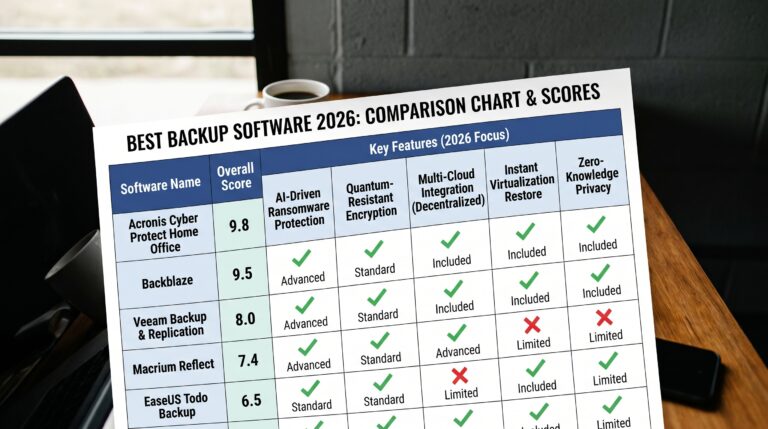
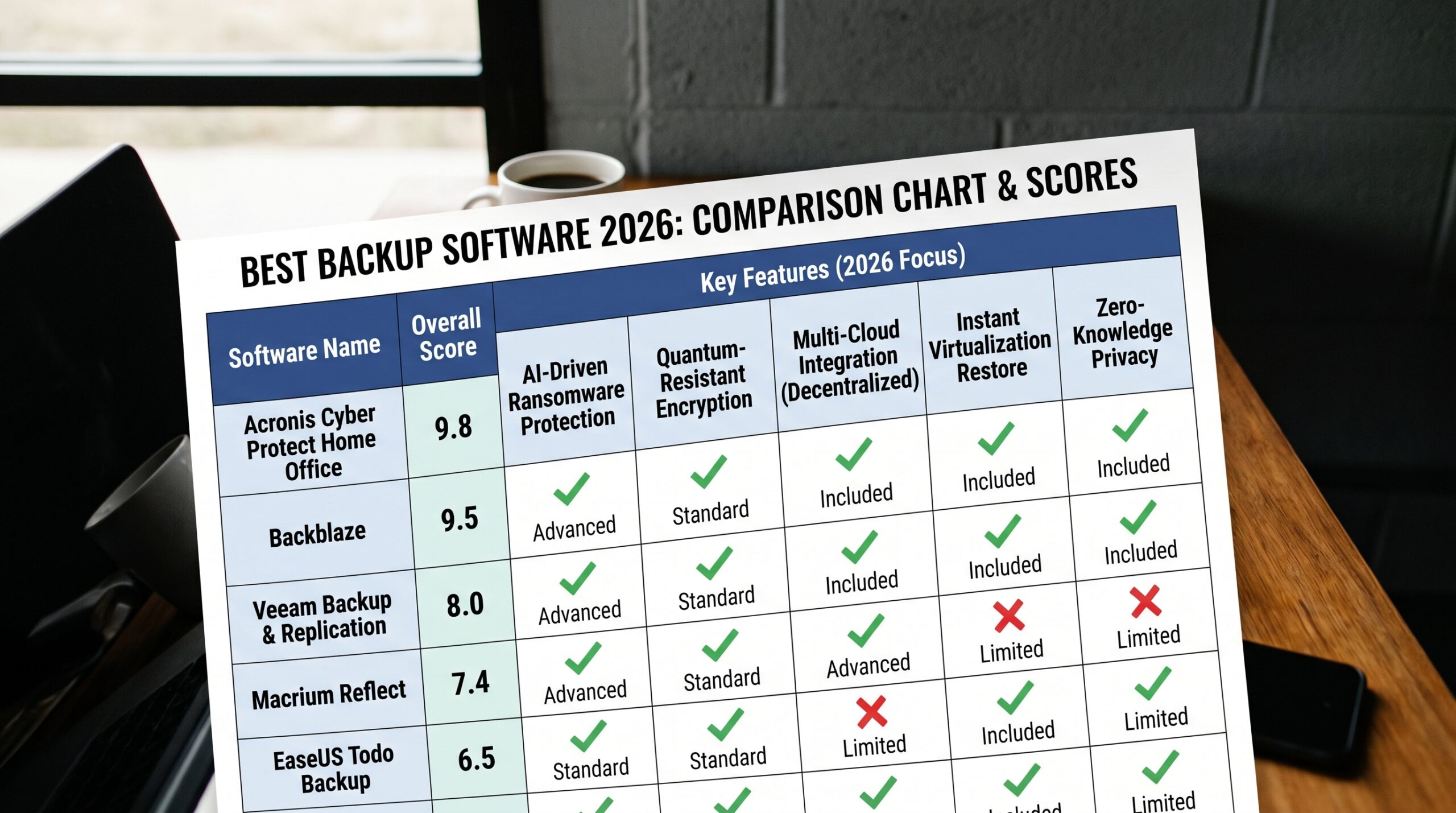
| Feature | Backblaze | Acronis Advanced | IDrive 5TB | EaseUS Cloud |
|---|---|---|---|---|
| Storage | Unlimited | 500GB | 5TB | 250GB |
| Disk Image Backup | ❌ | ✅ | ✅ Win | ✅ Win |
| Bare-Metal Restore | ❌ | ✅ | ❌ | ❌ |
| Ransomware Protection | ❌ | ✅ Active | ❌ | ❌ |
| External Drive Backup | ✅ Included | ✅ | ✅ | ✅ |
| Physical Drive Restore | ✅ | ❌ | ✅ | ❌ |
| Multi-Device | ❌ (1 per sub) | ✅ up to 5 | ✅ Unlimited | ✅ |
| Zero-Knowledge Encryption | ❌ | ✅ | ✅ opt-in | ❌ |
| RAM at Idle | 43MB | 231MB | 187MB | 156MB |
| Annual Price | $99 | $89.99 | $79.50 | $29.99 |
| Apps Champ Score | 9.0 | 9.4 | 8.6 | 9.1 |
Who Should Buy Backblaze?
Buy It If…
- You have a large data set (1TB+) that makes tiered-storage pricing expensive
- You want the simplest backup experience — install and forget
- You are following the 3-2-1 rule and need an offsite cloud component to complement your local backup
- You have external drives you need backed up at no extra cost
- Physical drive delivery is appealing for large recovery scenarios
- You want consistent pricing with no renewal surprises
Skip It If…
- You need disk image backup and bare-metal OS restore after a complete drive failure
- Active ransomware protection is a priority — Acronis is the right tool
- You need zero-knowledge encryption — Backblaze uses standard key management
- You need to back up multiple computers economically — IDrive or Acronis multi-device plans may be better value
- Your data is under 500GB — Acronis Advanced at $89.99/year is comparable in price with more features
Frequently Asked Questions About Backblaze Review 2026
Q: Is Backblaze worth it in 2026? A: Yes — for users who need unlimited cloud backup at the lowest cost. $99/year for truly unlimited storage with no configuration required is exceptional value. For a photographer with 3TB of RAW files, Backblaze costs less than Acronis’s 5TB tier. The key limitation to accept: Backblaze is cloud file backup only — no disk imaging, no bare-metal restore, no active ransomware protection. If those features matter, Acronis is the right complement or alternative.
Q: Does Backblaze do full system backup? A: No. Backblaze backs up your files to the cloud — it does not create disk images or bootable recovery media. If your hard drive fails completely, you reinstall Windows or macOS, reinstall applications, then download your files from Backblaze. This recovery process takes significantly longer than Acronis’s bare-metal restore from a disk image. For full system recovery capability, Acronis Cyber Protect Home Office is the right addition to a Backblaze subscription.
Q: How does Backblaze handle ransomware? A: Backblaze provides passive ransomware protection — your cloud backup copies were created before the ransomware event and remain clean. With 12-month file versioning enabled, you can restore clean file versions from before the ransomware encrypted them. Backblaze does not actively detect or block ransomware on your computer — it only preserves clean copies in the cloud. For active ransomware defence, Acronis or Malwarebytes Premium are required alongside Backblaze.
Q: Is Backblaze encryption secure? A: Backblaze uses AES-128 encryption for data in transit and at rest. This is standard encryption that protects your data from third-party access during transmission and from data centre breaches. It is not zero-knowledge encryption — Backblaze holds the encryption keys and could theoretically decrypt your data if compelled by legal process. For users who require zero-knowledge encryption (where only you hold the keys), enable Backblaze’s optional personal encryption key feature — this makes your backup zero-knowledge, though you must securely store the key yourself.
Q: How long does the first Backblaze backup take? A: It depends on your data volume and internet upload speed. On a 1Gbps fibre connection, approximately 170GB uploads per hour — a 1TB backup takes roughly 6 hours. On a 100Mbps connection, expect approximately 40GB/hour — a 1TB backup takes about 25 hours of upload time (running in the background over several days). Backblaze runs continuously in the background, so the initial backup completes over days without any action from you.
Final Verdict
After six weeks of testing, our Backblaze review 2026 verdict is unambiguous: for unlimited cloud file backup at the lowest cost and with the least configuration friction, Backblaze is the best service available.
The unlimited storage model, zero-configuration setup, 12-month versioning, external drive coverage, and physical delivery restore option combine to create a product that genuinely delivers on its simple promise. The 43MB RAM footprint means it runs completely invisibly in the background.
The limitations are equally clear: no disk imaging, no bare-metal restore, no active ransomware protection, no zero-knowledge encryption by default. For users who need those capabilities, Acronis Cyber Protect Home Office is the right complement — use Acronis for local imaging and active security, Backblaze for unlimited offsite cloud.
For users whose primary need is unlimited, automatic, hands-off cloud backup: Backblaze is the answer at $99/year.
Apps Champ Score: 9.0 / 10
Try Backblaze Free for 30 Days →

Was this review helpful?