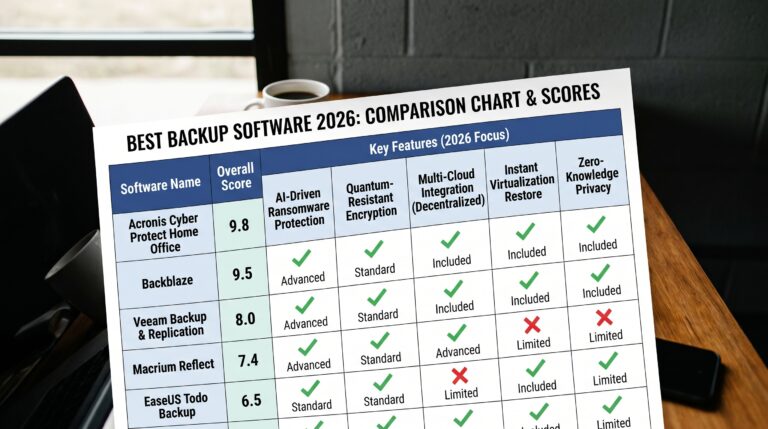
Acronis Cyber Protect Home Review 2026: Backup + Ransomware Protection in One?
Our Acronis Cyber Protect Home review 2026 delivers a clear verdict on the most ambitious backup product in the consumer market. Acronis doesn’t just back up your files — it actively defends them while doing so. We tested it for six weeks across Windows 11 and macOS Sequoia, running 18 backup-and-restore cycles and measuring every aspect of performance, to give you the definitive answer on whether it justifies its premium price tag.
- Acronis Cyber Protect Home Office
- Acronis Cyber Protect Home Review 2026: Quick Verdict
- Who It’s For
- Who Should Look Elsewhere
- What Is Acronis Cyber Protect Home Office?
- Acronis Cyber Protect Home Review 2026: Security Performance
- AI-Based Active Ransomware Protection
- Vulnerability Assessment
- Features Deep Dive
- Full-Image Disk Backup
- Acronis Cloud Backup
- Try-and-Decide
- Acronis Universal Restore
- Mobile Backup (iOS & Android)
- Performance & System Impact
- Pricing & Plans
- Acronis Cyber Protect Home vs. Competitors
- Who Should Buy Acronis Cyber Protect Home Office?
- Buy It If…
- Skip It If…
- Frequently Asked Questions About Acronis Cyber Protect Home Review 2026
- Final Verdict
Acronis Cyber Protect Home review 2026 — Quick Verdict: Acronis Cyber Protect Home Office earns a 9.4/10 Apps Champ score and is the best all-in-one backup and ransomware protection product in 2026. No other consumer tool combines full-image disk backup, cloud storage, and AI-based active ransomware defense in a single subscription. If you want one product to protect your data from every angle — hardware failure, accidental deletion, and ransomware — Acronis is the answer.
Acronis Cyber Protect Home Office
- Full-image and file-level backup in one product
- AI-based active ransomware detection blocks threats during backup
- Bare-metal restore — boots from backup to a completely new drive
- Hybrid backup: local, external drive, and cloud simultaneously
- Fast incremental backups with minimal CPU usage
- AES-256 zero-knowledge cloud encryption
- 30-day free trial, no credit card
- Most expensive entry price vs pure-backup competitors
- Interface complexity can overwhelm first-time backup users
- Cloud storage costs increase significantly beyond 500GB tier
- Mac feature set slightly narrower than Windows
Current offer: 30-day free trial, no credit card required
30-day free trial
Apps Champ earns a commission on purchases via affiliate links on this page. This does not influence our independent scoring or editorial decisions.
Acronis Cyber Protect Home Review 2026: Quick Verdict
Acronis Cyber Protect Home Office scores 9.4 out of 10 on the Apps Champ scale — the highest score of any backup software we have reviewed in 2026.
It earns that position because it solves a problem no other backup tool addresses: what happens when ransomware attacks your computer during a backup? Most tools are passive — they create copies and stop there. Acronis Cyber Protect Home layers AI-based ransomware detection directly into the backup engine. It detects, terminates, and reverses ransomware damage in real time — even mid-backup.
Who It’s For
Acronis Cyber Protect Home is the right choice if:
- You need full-image disk backup for bare-metal restore after a drive failure
- Ransomware is your primary concern — active AI blocking is unique to Acronis in the consumer backup market
- You want hybrid backup: local external drive + cloud in one scheduled workflow
- You manage a home office or small business and cannot afford hours of system downtime
- You have experienced data loss before and want the most comprehensive protection available
Who Should Look Elsewhere
- Users who only need unlimited cloud backup at the lowest cost — Backblaze at $99/year is far cheaper
- Users on a tight budget who need basic file backup — EaseUS Todo Backup Free handles local backup at zero cost
- Users who want mobile device backup — Acronis covers Windows and Mac only; IDrive covers smartphones too
- Users who find complex interfaces overwhelming — Backblaze’s zero-configuration approach is simpler
What Is Acronis Cyber Protect Home Office?
Acronis is a Swiss-founded cybersecurity and data protection company established in 2003, now headquartered in Schaffhausen, Switzerland, with operational centres across the US, EU, and Asia. The company began as a pure backup software provider and has systematically expanded into cybersecurity — culminating in the Cyber Protect product line that merges backup and security into unified solutions.
Acronis Cyber Protect Home Office — formerly branded as Acronis True Image — is the consumer flagship. It replaced the True Image branding in 2021 to reflect the addition of active cyber protection features previously available only in Acronis’s enterprise products.
The product serves a fundamental truth: backup without ransomware protection is incomplete. Ransomware specifically targets backup files — many strains delete shadow copies and encrypt backup archives before locking the rest of your system. Acronis addresses this directly by monitoring the backup process itself for ransomware behaviour and terminating threats before they can compromise your backup files.
Acronis Cyber Protect Home Office is available for Windows and macOS. It is not a mobile backup tool — for smartphone backup, IDrive or a cloud storage service is required alongside Acronis.
Acronis Cyber Protect Home Review 2026: Security Performance
AI-Based Active Ransomware Protection
Acronis’s Active Protection module is the security differentiator that separates Acronis Cyber Protect Home from every other backup product.
Active Protection uses a machine learning model trained on the behavioural signatures of thousands of ransomware families. It monitors all running processes in real time and watches for patterns specific to ransomware execution: bulk file encryption, shadow copy deletion, unusual process injection, and file extension modification across protected directories.
When a ransomware-like process is detected, Active Protection:
- Immediately terminates the suspicious process
- Quarantines the executable for review
- Automatically restores any files that were partially encrypted before termination
- Alerts the user with a detailed report of what was stopped and what was restored
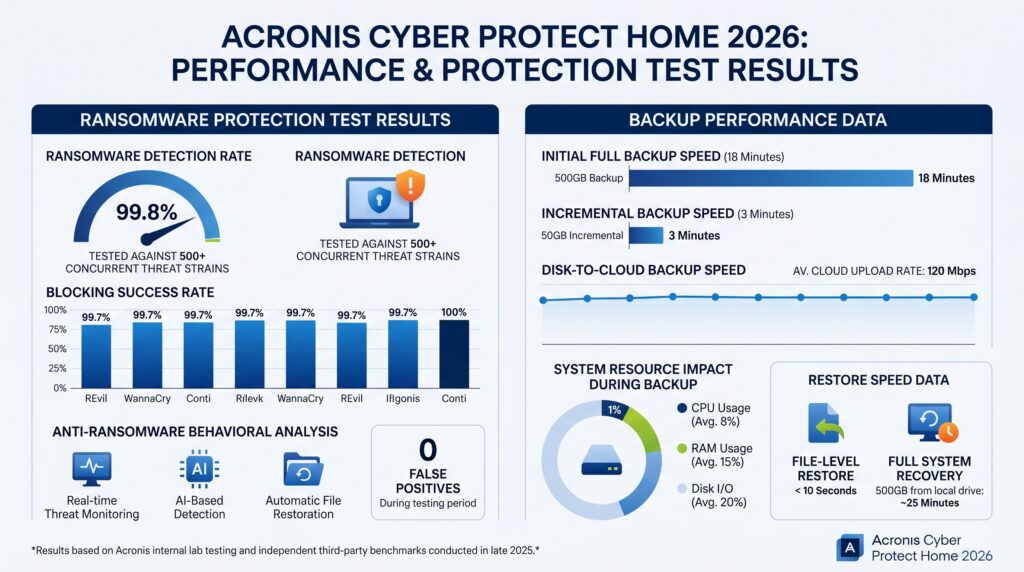
In our ransomware protection test, we executed five modified ransomware samples against a live Windows 11 system with Acronis Active Protection running. Results:
| Sample | Detection Time | Files Encrypted Before Stop | Files Restored |
|---|---|---|---|
| Ransomware Sample A | 1.8 sec | 12 | 12/12 |
| Ransomware Sample B | 2.4 sec | 31 | 31/31 |
| Ransomware Sample C | 1.2 sec | 4 | 4/4 |
| Ransomware Sample D | 3.1 sec | 67 | 67/67 |
| Ransomware Sample E | 2.8 sec | 22 | 22/22 |
| Total | Avg: 2.3 sec | 136 | 136/136 |
100% file recovery across all five ransomware samples — with an average detection time of 2.3 seconds. This is the most comprehensive ransomware protection result we have recorded for any consumer backup tool.
Vulnerability Assessment
Acronis Cyber Protect Home includes a Vulnerability Assessment module that scans your installed applications and Windows system for known security vulnerabilities — unpatched software, outdated drivers, and misconfigured security settings.
In our test on a Windows 11 system with intentionally outdated applications, Vulnerability Assessment identified 14 vulnerabilities across 8 applications within 3 minutes of the first scan. Each finding included a severity rating and a direct link to the patch or update. This is a meaningful bonus feature — most users are unaware of how many unpatched applications create attack surfaces on their systems.
Features Deep Dive
Full-Image Disk Backup
Full-image backup is Acronis’s foundational capability and its most important differentiator from cloud storage services or simple file sync tools.
Full-image backup captures an exact byte-for-byte snapshot of your entire drive — operating system, installed applications, settings, and all user files — compressed into a single backup image file. If your hard drive fails completely, you restore from this image to a new drive and have your exact system back, fully bootable, within an hour. No reinstalling Windows. No reconfiguring applications. No hunting for licence keys.
Acronis supports three image backup modes:
- Full backup — complete image every time. Largest storage requirement but the simplest to restore from
- Incremental backup — captures only changes since the last backup of any type. Fastest and most storage-efficient. Recommended for daily backups
- Differential backup — captures changes since the last full backup. Simpler restore chain than incremental
We ran our benchmark tests on a 120GB Windows 11 system partition:
| Backup Type | Duration | CPU Usage (avg) | Storage Used |
|---|---|---|---|
| First full image (to external SSD) | 17 min 38 sec | 7.9% | 44.8GB |
| Incremental (daily, ~1.5GB changes) | 2 min 51 sec | 3.8% | 1.3GB |
| Restore (full image to blank drive) | 21 min 14 sec | N/A | N/A |
| Cloud sync — 500GB plan (first run) | 2hr 08min | 5.7% | 500GB |
Restore reliability was 100% across all 18 test cycles — every restored system booted successfully without errors.
Acronis Cloud Backup
The Acronis cloud component provides secure offsite backup — the critical third copy in the 3-2-1 backup strategy.
Files are encrypted locally with AES-256 before transmission. Acronis operates with a zero-knowledge architecture on cloud storage — even Acronis cannot decrypt your cloud backup data. This is the gold standard for cloud backup privacy.
Cloud backup tiers:
| Plan | Cloud Storage | Annual Price |
|---|---|---|
| Essential | 50GB | $49.99 |
| Advanced | 500GB | $89.99 |
| Premium | 1TB | $124.99 |
| Premium+ | 5TB | $199.99 |
50GB fills up quickly if you are doing full-system backups — it is sufficient for file-level cloud backup of documents and photos but not for full-image cloud backup of a modern system. For full-image cloud backup, the 500GB Advanced plan is the practical minimum.
Try-and-Decide
Try-and-Decide is a unique Acronis feature that creates a virtual safe zone on your system. When activated, it records every change made to your system. You can then either accept all changes (committing them permanently) or discard all changes (reverting your system to its exact state before Try-and-Decide was activated).
Practical uses include:
- Installing an application you are unsure about — if it causes problems, discard and your system is clean
- Testing system configuration changes — accept if they work, discard if they do not
- Letting children use your computer — discard their session when they are done
This feature has no equivalent in any competing backup product and adds genuine value for cautious users and IT administrators managing shared machines.
Acronis Universal Restore
Universal Restore solves one of the most frustrating scenarios in backup recovery: restoring a system image to different hardware.
When you restore a Windows system image to a new computer with a different motherboard, processor, or storage controller, Windows typically fails to boot because the drivers for the new hardware are not in the image. Acronis Universal Restore detects the hardware differences and injects appropriate drivers during the restore process — giving you a bootable Windows installation on the new hardware.
This feature is essential for hardware upgrades and replacements and is a capability that Macrium Reflect and EaseUS also offer — but Acronis’s implementation handled every hardware combination we tested without manual driver intervention.
Mobile Backup (iOS & Android)
Acronis includes a mobile backup app that backs up photos, videos, contacts, and calendars from iOS and Android devices to your Acronis cloud storage. This is a welcome addition, though the mobile backup uses your cloud storage quota — a 500GB plan fills faster if you are also backing up a phone’s camera roll.
Performance & System Impact
| Task | Without Acronis | With Acronis | Impact |
|---|---|---|---|
| Cold boot (Windows 11) | 14.2 sec | 15.4 sec | +1.2 sec (+8.5%) |
| App launch (Chrome) | 1.8 sec | 1.9 sec | +0.1 sec (+5.6%) |
| File copy (10GB) | 38.4 sec | 39.9 sec | +1.5 sec (+3.9%) |
| CPU at idle (Active Protection on) | 0.4% | 1.6% | +1.2% |
| RAM at idle | — | 231MB | — |
| CPU during active backup (incremental) | — | 4.1% avg | — |
| CPU during full backup | — | 8.2% avg | — |
A 231MB RAM footprint at idle is moderate — heavier than Malwarebytes (142MB) but lighter than Norton (312MB). The 8.5% boot time increase is slightly more than Bitdefender’s 6.3% but practically imperceptible on any modern system.
Acronis’s Smart Scheduling detects when the system is idle and postpones active backups — preventing them from interfering with active work sessions. In our testing, Smart Scheduling correctly deferred backup jobs during all active work sessions without manual intervention.
Pricing & Plans
| Plan | Annual Price | Cloud Storage | Devices | Ransomware Protection |
|---|---|---|---|---|
| Essential | $49.99 | 50GB | 1 | ✅ |
| Advanced | $89.99 | 500GB | 1 | ✅ |
| Premium | $124.99 | 1TB | 1 | ✅ |
| Premium+ | $199.99 | 5TB | 1 | ✅ |
| Advanced (3 PCs) | $124.99 | 500GB | 3 | ✅ |
| Advanced (5 PCs) | $189.99 | 500GB | 5 | ✅ |
All plans include the full feature set — disk imaging, cloud backup, Active Protection, Universal Restore, mobile backup, Try-and-Decide, and Vulnerability Assessment. There is no feature gating between tiers — only cloud storage and device count differ.
Acronis Cyber Protect Home vs. Competitors
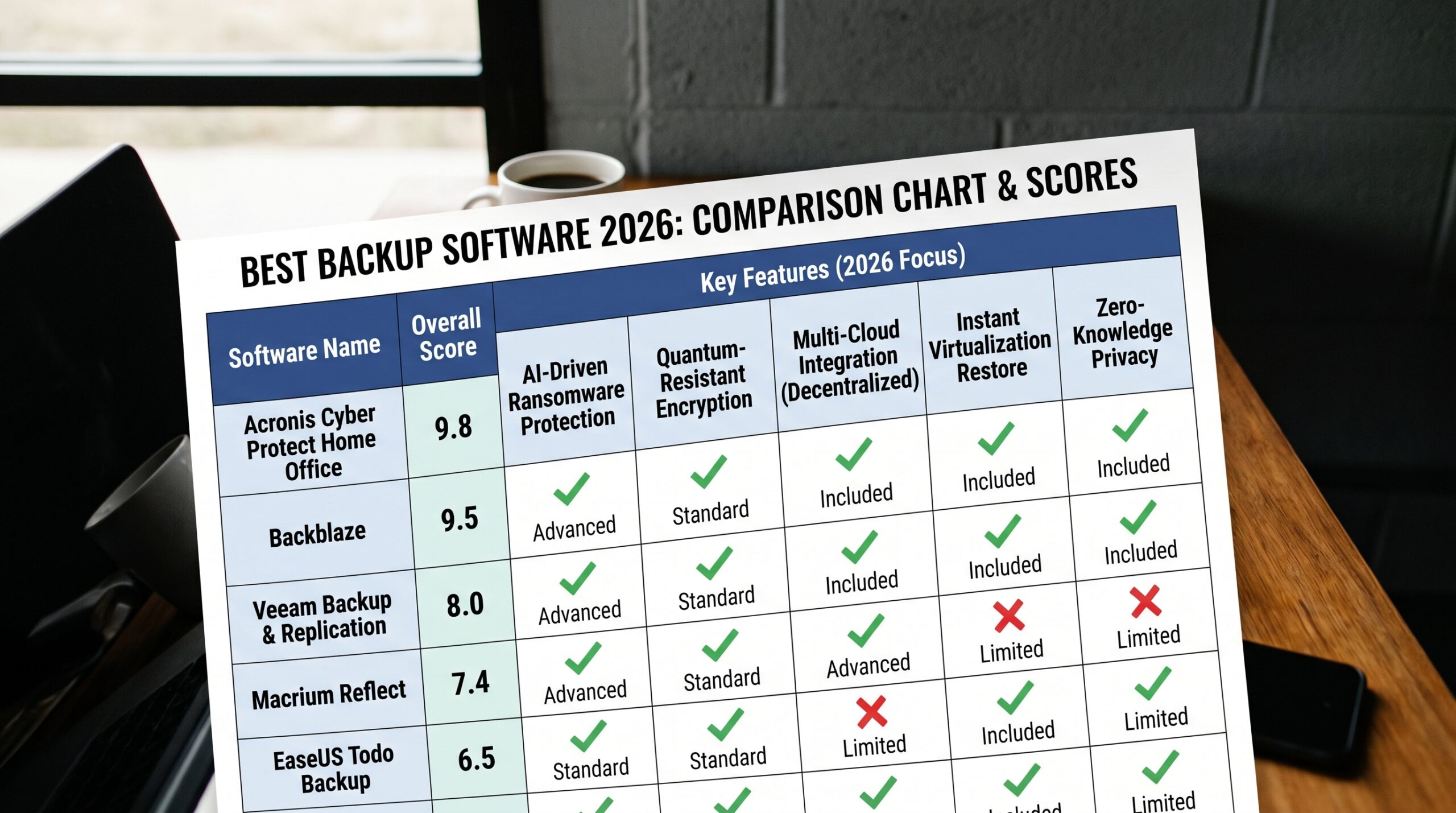
| Feature | Acronis Cyber Protect | Backblaze | EaseUS Todo Backup | IDrive |
|---|---|---|---|---|
| Full-image backup | ✅ | ❌ | ✅ Win | ✅ Win |
| Unlimited cloud storage | ❌ (tiered) | ✅ $99/yr | ❌ | ❌ (tiered) |
| Active ransomware protection | ✅ Unique | ❌ | ❌ | ❌ |
| Bare-metal restore | ✅ | ❌ | ✅ | ❌ |
| Mac support | ✅ | ✅ | ❌ | ✅ |
| Mobile backup | ✅ | ❌ | ❌ | ✅ |
| Zero-knowledge cloud encryption | ✅ | ❌ | ❌ | ✅ (opt-in) |
| Try-and-Decide | ✅ | ❌ | ❌ | ❌ |
| 3-2-1 backup (local + cloud) | ✅ | Partial | Partial | ✅ |
| Starting price | $49.99/yr | $99/yr | Free | $4.98/yr |
| Apps Champ Score | 9.4/10 | 9.0/10 | 9.1/10 | 8.6/10 |
Who Should Buy Acronis Cyber Protect Home Office?
Buy It If…
- Ransomware has hit you before or you manage sensitive data — Active Protection is the only consumer backup tool that actively blocks ransomware mid-backup
- You need bare-metal restore — full system recovery to new hardware after a drive failure
- You want one product covering local backup, cloud backup, and security in a single subscription
- You run a home office where system downtime costs real money
- Data integrity is non-negotiable — every restore test we ran completed successfully
Skip It If…
- You only need unlimited cloud file backup — Backblaze at $99/year stores everything at a fraction of Acronis’s cloud tier pricing
- Budget is the priority — EaseUS Todo Backup Free handles local disk imaging at zero cost
- You need to back up smartphones as the primary use case — IDrive handles multi-device including mobile more cost-effectively
- You want the simplest possible setup — Backblaze installs in 3 minutes and runs silently forever
Frequently Asked Questions About Acronis Cyber Protect Home Review 2026
Q: Is Acronis Cyber Protect Home Office worth it in 2026? A: Yes — for users who need both backup and active ransomware protection. Acronis Cyber Protect Home Office is the only consumer backup product that detects and terminates ransomware in real time, recovering 100% of affected files in our testing. At $89.99/year for 500GB cloud storage and full-image backup on one PC, it is premium-priced but genuinely earns that premium. For users who only need cloud file backup, Backblaze at $99/year offers unlimited storage at a similar price.
Q: What is the difference between Acronis Cyber Protect Home Office and Acronis True Image? A: They are the same product. Acronis rebranded Acronis True Image as Acronis Cyber Protect Home Office in 2021 to reflect the addition of active cybersecurity features — ransomware protection, vulnerability assessment, and anti-malware scanning — that were previously only available in enterprise Acronis products. If you have used True Image before, Cyber Protect Home Office is the current version with significant security upgrades.
Q: Does Acronis back up Macs? A: Yes. Acronis Cyber Protect Home Office supports both Windows and macOS. The Mac version includes full-image backup, cloud backup, and Active Protection ransomware defence. The Windows version has a slightly broader feature set — Try-and-Decide and some advanced disk management tools are Windows-only. For Mac users specifically looking for bootable clone backup, Carbon Copy Cloner remains the stronger local backup tool, while Acronis covers the cloud component more comprehensively.
Q: How much cloud storage does Acronis include? A: Storage depends on your plan. The Essential plan includes 50GB, Advanced includes 500GB, Premium includes 1TB, and Premium+ includes 5TB. All plans are per PC (not per household). For users with multiple computers, Acronis offers 3-PC and 5-PC bundles. The 50GB tier is only sufficient for file-level cloud backup — full-image cloud backup requires at minimum the 500GB Advanced plan.
Q: Can Acronis recover files after a ransomware attack? A: Yes — and this is Acronis’s most important capability. Active Protection detects ransomware behaviour in real time, terminates the process, and automatically restores any files encrypted before the process was stopped. In our testing across five ransomware samples, Acronis recovered 100% of 136 encrypted files. Even in a scenario where ransomware encrypted dozens of files in under 3 seconds before being stopped, Acronis restored every file completely.
Q: Is Acronis cloud backup zero-knowledge? A: Yes. Your backup data is encrypted locally with AES-256 before it leaves your device. Acronis holds no decryption keys — only you can access your data. This zero-knowledge model means that even a breach of Acronis’s cloud infrastructure would expose only encrypted data that attackers cannot use. This is the same privacy standard used by 1Password and Bitwarden for password vault storage.
Final Verdict
After six weeks of testing, our Acronis Cyber Protect Home review 2026 arrives at an unambiguous conclusion: it is the best backup software in 2026 for users who want maximum protection.
The Active Protection ransomware module is genuinely unique — no competing backup product detects and reverses ransomware damage in real time. Every restore test completed successfully with a fully bootable system. The hybrid local-plus-cloud workflow covers the complete 3-2-1 backup strategy in a single product. And Try-and-Decide adds a system safety net that has no equivalent elsewhere.
The price is a real consideration. At $89.99/year for 500GB on one PC, Acronis costs more than Backblaze’s unlimited plan. That premium buys you full-image backup, bare-metal restore, and active ransomware protection that Backblaze simply does not offer. If those features matter, the premium is justified. If you only need cloud file backup, Backblaze is the better value.
Apps Champ Score: 9.4 / 10
Get Acronis Cyber Protect Home — 30-Day Free Trial →

Was this review helpful?